
6s · 16:9
Kickflip
The Kickflip · Side View
The side view of a car lifting over a parked lineup, rolling in the air and settling through vapor.
Tesla · 11.56–17.30s · Source footage
Flying Car AI Video is a Flying Car AI Video Generator that turns one photo of your car into a 15-second ramp-jump and mid-air flip video. Upload a photo, pick a stunt template and download a silent MP4. No prompt needed.
One photo. 5 ways to make it fly.
Selected:The Ramp · Close-Up Stunt· 15s · 4:3
Your photo
JPG, PNG or WebP · Up to 10 MB
Output quality
The Ramp · Close-Up Stunt · About 15 seconds · 4:3 landscape
Photos are checked when you generate, before credits are charged.
Your video will be silent
No music, voices or sound effects. Add your own audio in TikTok, Reels or your video editor.
The Ramp · Close-Up Stunt
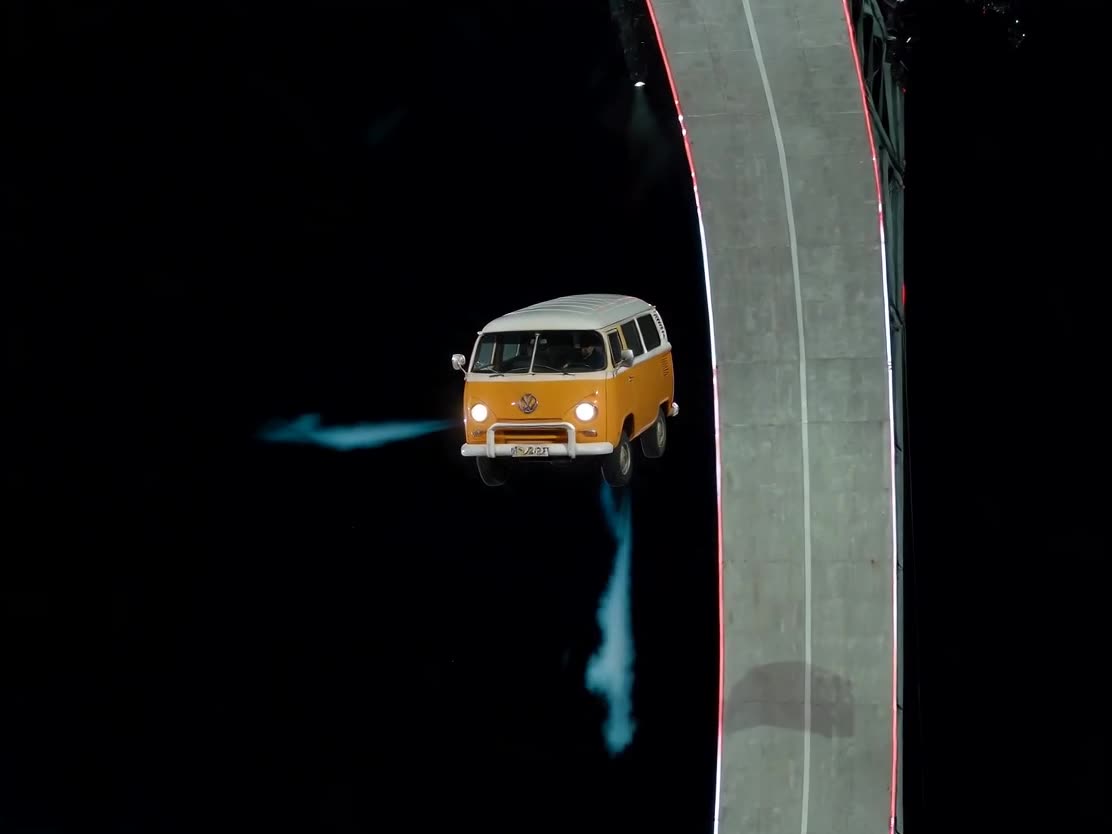
Close shots of the whole stunt: the car lines up at the ramp, climbs the curved wall, launches, rolls and lands head-on through vapor.
Owner-supplied reference · The video above is a sample generated on this site with this template; the linked reference footage supplies the motion. AI results may vary; check the vehicle and motion before sharing.
Track progress and find your video in My creations. Avoid submitting again while it is processing.
Each sample below started from one photo of a vehicle. The Flying Car AI Video Generator keeps its shape and colors, then follows the reference ramp climb, flip and smoky landing.
About 15 seconds · 720p HD · 4:3
About 15 seconds · 480p Standard · 16:9
Samples were generated on this site for illustration. Videos you generate are silent.
Start with one photo. Choose the quality. Download your finished stunt.
Step 01
Use a sharp, well-lit photo that shows the whole vehicle and its details. Cars, vans, trucks and motorcycles all work; photos with people are rejected.
JPG, PNG or WebP · Up to 10 MB
Step 02
Choose a ramp or kickflip stunt. Select 480p for 50 credits or 720p for 100 credits, confirm you can use the image, then press generate.
6 to 15 seconds · Silent MP4
Step 03
Watch the result here or in My creations and download the MP4. Add music in TikTok, Reels or CapCut before you post.
Preview · Download · Add your own audio
No prompt to write and no reference video to upload. The Flying Car AI Video Generator handles both.
One photo. The complete stunt.
A flying car AI video is a short stunt clip where your car climbs a curved ramp, launches into the air, flips and lands in a cloud of vapor. Your photo decides how the car looks. A built-in reference video decides the motion, timing and camera cuts. That split is what makes a Flying Car AI Video Generator different from a normal image-to-video tool: you never have to describe the stunt, and the car keeps its own shape instead of turning into a generic sports car.
Use one sharp photo with the whole vehicle in frame. Its shape, paint and details guide the replacement. No stunt pose or matching background is needed.
About 15 seconds for the ramp stunt, in 480p or 720p. The video is silent, so add music or sound effects when you share it.
Upload my car photoMore ways to fly
The Tesla Roadster demo made the kickflip famous. Our templates follow that kind of motion with your own car in the hero spot.
Side view, head-on view and trackside replay. Each one is a single airborne roll over a parked lineup with a vapor touchdown, 6 to 8 seconds in 16:9.
Kickflip
The side view of a car lifting over a parked lineup, rolling in the air and settling through vapor.
Tesla · 11.56–17.30s · Source footage
Kickflip
A front-facing kickflip, with a Semi and parked vehicles lining up below.
Tesla · 3.60–11.50s · Source footage
Kickflip
A trackside replay of the airborne roll and vapor-covered landing.
Tesla · 17.36–25.45s · Source footage
The curved-ramp climb, mid-air flip and smoky landing. The close-up cut runs about 15 seconds in 4:3 and is the default template; the full side view runs 15 seconds in 16:9.
Ramp
Close shots of the whole stunt: the car lines up at the ramp, climbs the curved wall, launches, rolls and lands head-on through vapor.
Tesla · 0–1.6s, 3.2–9.2s, 17.3–24.6s · Source footage
Ramp
The wide shot follows the car up the curved ramp, off its lip and down through a controlled roll.
Tesla · 2.15–16.95s · Source footage
These clips are source references. The Flying Car AI Video Generator puts the vehicle from your photo into the motion; AI results may vary.
The Flying Car AI Video Generator works with your daily driver, a classic car, a dream car from a dealer listing or even a camper van. Keep one vehicle in frame and crop out other cars and people. A side or three-quarter angle gives the model the clearest view of the body, wheels and paint.
Every video downloads as a silent MP4, so you can add a trending sound, captions or a voice-over in your own editor. If you searched for a flying car CapCut template, this is the faster route: generate the stunt here, then finish it in CapCut. For vertical feeds, reframe the 4:3 or 16:9 result before posting.
Each video from the Flying Car AI Video Generator costs 50 credits at 480p or 100 credits at 720p. Credit packs start at $6.99. Pay once, no subscription, and purchased credits never expire.
The reference shows the target effect; generated results can vary. Review the photo tips and template notes before you buy.
$6.99
50 credits for 1 Standard video (480p).
One-time purchase · Credits never expire
Your pack includes
$9.99
100 credits for 1 HD video (720p), or 2 Standard videos (480p).
One-time purchase · Credits never expire
Your pack includes
$16.99
200 credits for 2 HD videos (720p), or 4 Standard videos (480p).
One-time purchase · Credits never expire
Your pack includes
$24.99
300 credits for 3 HD videos (720p), or 6 Standard videos (480p).
One-time purchase · Credits never expire
Your pack includes
No subscriptions. No recurring charges. Credits are added after payment is confirmed.
AI results can vary. Failed generations return your credits automatically. Refund policy
Photos, video specs, pricing and your finished video.
Upload one photo and get a ramp-jump and flip video from the Flying Car AI Video Generator. About 15 seconds, ready to download.
Upload my car photoIndependent AI video tool. Reference clips are identified as source footage. Not affiliated with Tesla or any vehicle manufacturer.